
This version use AES instead of RC4 and can interact with the latest version of Firefox.
Anyway it's nothing more than a basic Zeus v2.

iBank parser on the panel, monitoring of process:

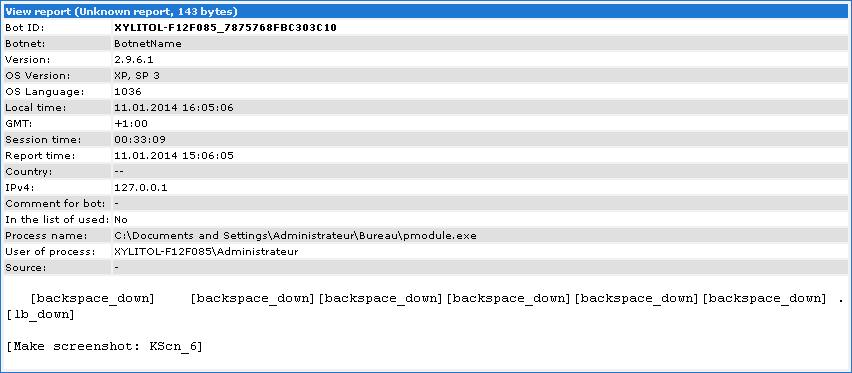
Now let's view an example of report from modules, keylog+screenshot:

Part of the static config (in plain on generated bot):

Installation process/dynamic config decoding (beware, dubstep):
And a small code because it's easier to understand:
<?php
function decode($data, $key) {
$td = mcrypt_module_open(MCRYPT_RIJNDAEL_128, '', MCRYPT_MODE_ECB, '');
$iv = mcrypt_create_iv(mcrypt_enc_get_iv_size($td), MCRYPT_RAND);
mcrypt_generic_init($td, $key, $iv);
mcrypt_generic($td, $data);
$data = mdecrypt_generic($td, $data);
mcrypt_generic_deinit($td);
mcrypt_module_close($td);
return $data;
}
function visualDecrypt(&$data) {
$len = strlen($data);
if ($len > 0)
for ($i = $len - 1; $i > 0; $i--)
$data[$i] = chr(ord($data[$i]) ^ ord($data[$i - 1]));
}
$data = file_get_contents('config.bin');
$key = md5('hasd7h12g1', true);
$decoded = decode($data, $key);
visualDecrypt($decoded);
$size = strlen($decoded);
header('Content-Type: application/octet-stream;');
header('Content-Transfer-Encoding: binary');
header('Content-Length: ' . $size);
header('Content-Disposition: attachment; filename=config_decrypted.dll');
header('Expires: 0');
header('Cache-Control: no-cache, must-revalidate');
header('Pragma: no-cache');
echo($decoded);
exit;
?>
function decode($data, $key) {
$td = mcrypt_module_open(MCRYPT_RIJNDAEL_128, '', MCRYPT_MODE_ECB, '');
$iv = mcrypt_create_iv(mcrypt_enc_get_iv_size($td), MCRYPT_RAND);
mcrypt_generic_init($td, $key, $iv);
mcrypt_generic($td, $data);
$data = mdecrypt_generic($td, $data);
mcrypt_generic_deinit($td);
mcrypt_module_close($td);
return $data;
}
function visualDecrypt(&$data) {
$len = strlen($data);
if ($len > 0)
for ($i = $len - 1; $i > 0; $i--)
$data[$i] = chr(ord($data[$i]) ^ ord($data[$i - 1]));
}
$data = file_get_contents('config.bin');
$key = md5('hasd7h12g1', true);
$decoded = decode($data, $key);
visualDecrypt($decoded);
$size = strlen($decoded);
header('Content-Type: application/octet-stream;');
header('Content-Transfer-Encoding: binary');
header('Content-Length: ' . $size);
header('Content-Disposition: attachment; filename=config_decrypted.dll');
header('Expires: 0');
header('Cache-Control: no-cache, must-revalidate');
header('Pragma: no-cache');
echo($decoded);
exit;
?>
You can find the decoded modules here:
JAVA: 7d7ae6ffbd9f3c7673b339f9b94493e5
BSS: cc98dabebe047c6115a6cd9d13ed3122
KEYLOG: 8ac1c7c019d16ff3b8a9543d46ae5e0e
And if you want to test yourself the WebInject, i usually use this code:
set_url http://requesttests.appspot.com* GP
data_before
</body>
data_end
data_inject
<center><img src="http://temari.fr/webinject.png" alt="Injected!"></center>
data_end
data_after
data_end
data_before
</body>
data_end
data_inject
<center><img src="http://temari.fr/webinject.png" alt="Injected!"></center>
data_end
data_after
data_end

